Authentication
All NINJIO API endpoints require authentication using an API key. This guide covers how to authenticate your requests and manage your API credentials.
API Key Authentication
Getting Your API Key
To generate an API key, you'll need to be an administrator on the NINJIO platform:
-
Login to the admin interface at https://admin.goninjio.com/
-
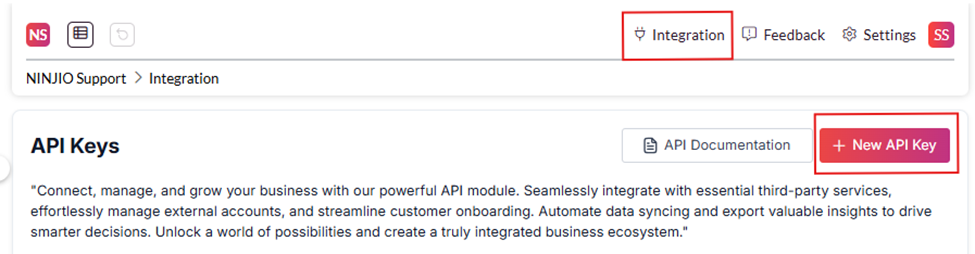
Click on Integration at the top right side of the screen
-
Click the New API Key button
-
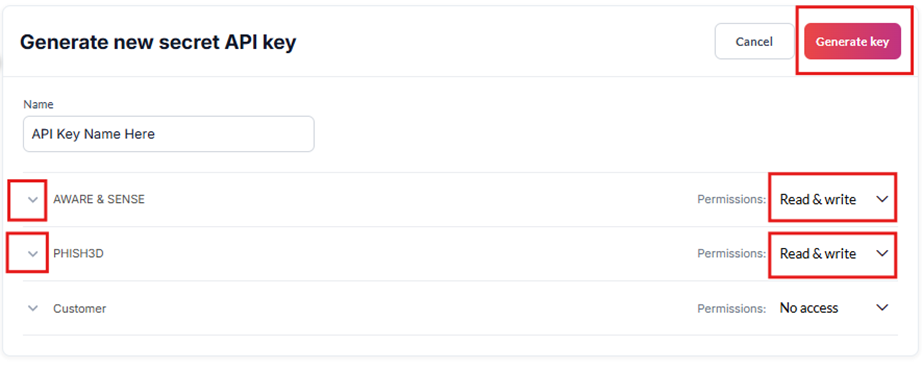
Fill out the form:
- Name your API key
- Select your read and write preferences for the access points you wish to use
-
Click Generate Key
-
Important: Copy the key immediately and store it somewhere safe - it can only be viewed once
API keys are unique per customer account and should be kept secure.
Using Your API Key
Include your API key in the request header:
GET /api/api_gateway/customer/campaigns/training/
Host: apigw.goninjio.com
apiKey: YOUR_API_KEY_HERE
Content-Type: application/json
Example with cURL
curl -X GET "https://apigw.goninjio.com/api/api_gateway/customer/campaigns/training/" \
  -H "apiKey: YOUR_API_KEY_HERE" \
  -H "Content-Type: application/json"
Example with JavaScript
const response = await fetch('https://apigw.goninjio.com/api/api_gateway/customer/campaigns/training/', {
  method: 'GET',
  headers: {
    'apiKey': 'YOUR_API_KEY_HERE',
    'Content-Type': 'application/json'
  }
});

const data = await response.json();
Example with Python
import requests

headers = {
    'apiKey': 'YOUR_API_KEY_HERE',
    'Content-Type': 'application/json'
}

response = requests.get(
    'https://apigw.goninjio.com/api/api_gateway/customer/campaigns/training/',
    headers=headers
)

data = response.json()
Security Best Practices
Protecting Your API Key
- Never commit API keys to version control
- Store keys in environment variables or secure configuration
- Use different keys for development and production environments
- Rotate keys regularly
Environment Variables
# .env file
NINJIO_API_KEY=your_api_key_here
NINJIO_BASE_URL=https://apigw.goninjio.com
import os
import requests

api_key = os.getenv('NINJIO_API_KEY')
base_url = os.getenv('NINJIO_BASE_URL')

headers = {'apiKey': api_key}
Rate Limits
- Standard rate limits apply to all API endpoints
- Contact support if you need higher rate limits for your integration
- Implement exponential backoff for retries
Error Handling
Authentication Errors
{
  "error": "Invalid API key",
  "status": 401
}
{
  "error": "API key required",
  "status": 401
}
Example Error Handling
if (response.status === 401) {
  console.error('Authentication failed - check your API key');
  // Handle authentication error
} else if (response.status === 403) {
  console.error('Access forbidden - insufficient permissions');
  // Handle permission error
}
Testing Your Authentication
Use this simple test to verify your API key works:
curl -X GET "https://apigw.goninjio.com/api/api_gateway/customer/campaigns/training/" \
  -H "apiKey: YOUR_API_KEY_HERE" \
  -H "Content-Type: application/json"
A successful response indicates your authentication is working correctly.